
A browser extension by PP IT Solutions
Turn text into
a link.
Linkify makes written web addresses clickable in page text and supported text fields, without selecting, copying and pasting.
 Linkify
One address. One click.
Fewer steps, every day
Open web addresses
right where they are.
Whether in notes, internal applications or dynamically loaded content, Linkify automatically recognises suitable HTTP and HTTPS addresses on each website you enable.
- 01
Directly in the text
Open addresses in ordinary page text and read-only textareas with a click or the keyboard.
- 02
Keep editing as usual
In editable textareas and text or URL fields, Ctrl+click opens the address. On a Mac, use ⌘+click. Ordinary clicking, selecting and typing continue to work.
- 03
New content, too
Suitable content is also processed when an enabled website loads it later.
Linkify in action
See a plain-text address become a link.
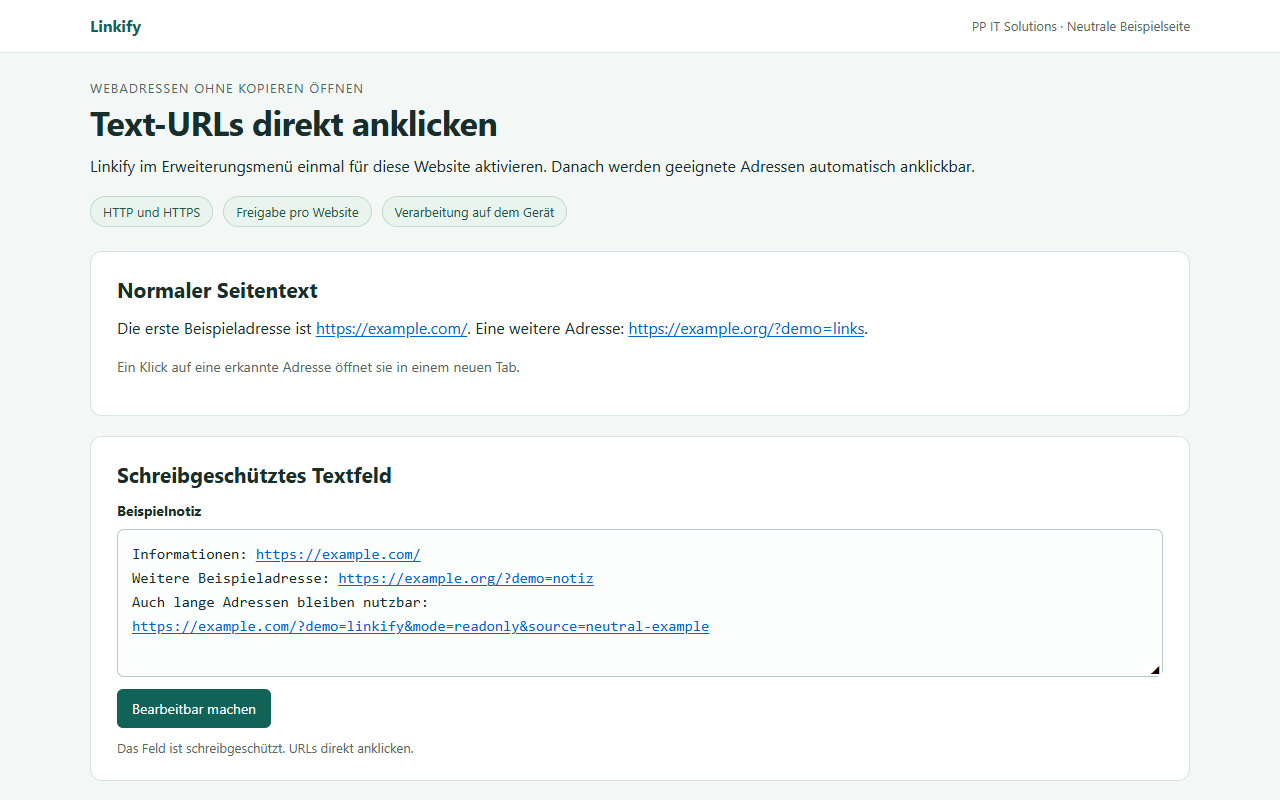
You choose which websites to enable
On your device.
Under your control.
Linkify is enabled separately for each website in the extension menu. Access to a specific website is requested only when you enable it and can be disabled there again.
Processing takes place in the browser. Linkify has no backend, uses no analytics or telemetry services and stores only your website permissions locally.
Full privacy notice for LinkifySupported content and limitations
HTTP and HTTPS in the main document are supported. Complex web editors, content in embedded frames and page shadow DOMs are not currently processed. The extension's interface is in German.
Direct contact
Support for Linkify.
Questions about the extension or trouble opening an address? Get in touch.